Your team’s projects are not failing because the people are wrong. They are failing because nobody agreed on who owns what, the deadline changed and half the team found out a week late, the status update from last Thursday lives in someone’s email, and the resource your developer needs is blocked on a task nobody marked as a dependency.
That is not a management problem. That is a systems problem, and project management software is what fixes it.
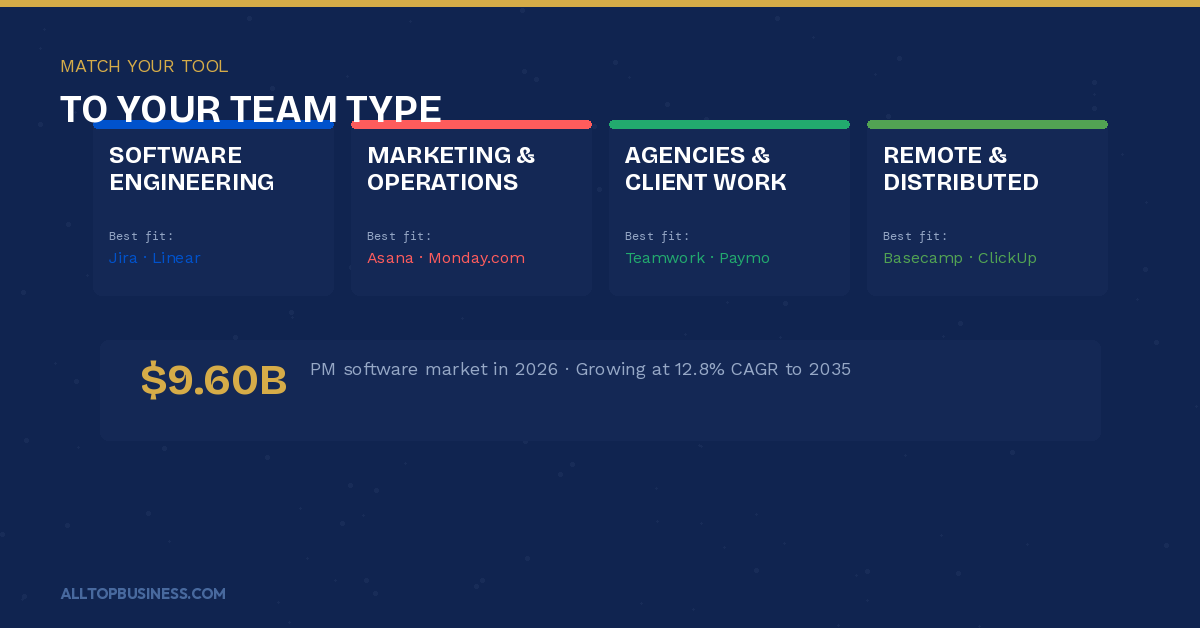
The project management software market is valued at approximately $9.60 billion in 2026, with nearly 70% of platforms now including AI-powered features for predictive analytics and automated scheduling. Yet despite all the tooling available, only 23% of project managers actually use PM software for team collaboration, which means the gap between teams that are organized and teams that are not has never been wider.
This guide covers some project management tools evaluated against the same criteria, from solo-friendly tools to enterprise-grade portfolio management systems. We evaluated over 35 platforms to arrive at this list. Only tools with documented use cases in business team environments and substantive independent review data were included.
For related reading on managing your broader business software stack, browse the AllTopBusiness blog.
Quick Picks: Best Project Management Software
| Label | Pick |
|---|---|
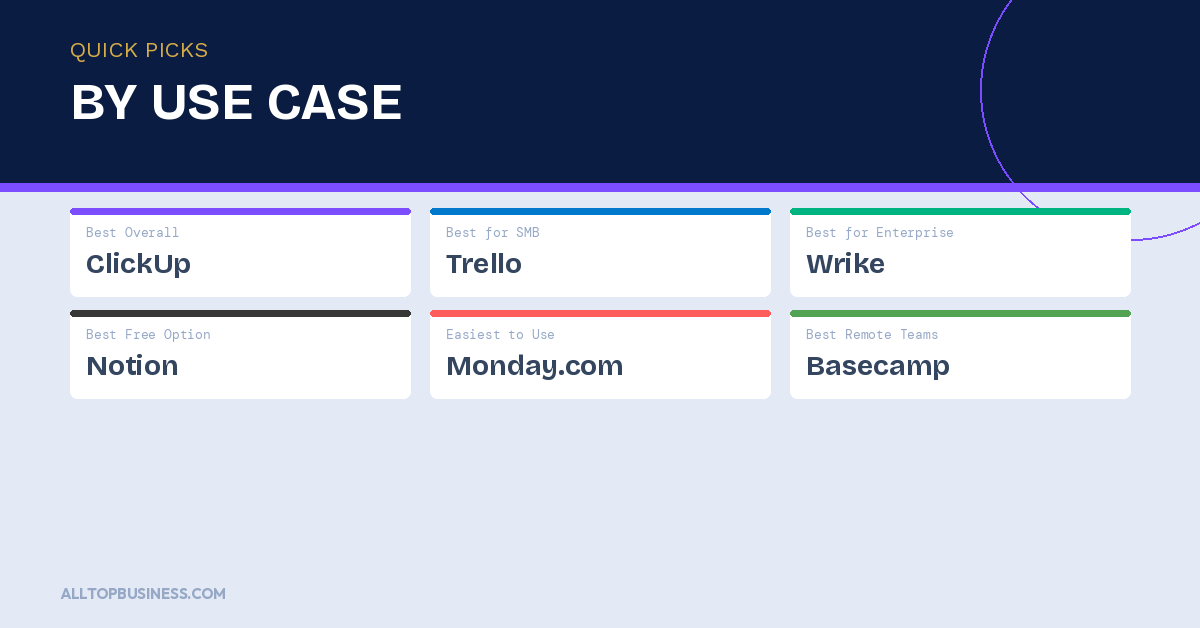
| Best Overall | ClickUp — the most complete all-in-one PM platform for teams of every size |
| Best for Small Business | Trello — visual kanban boards with zero learning curve |
| Best for Enterprise | Wrike — governance, approvals, and portfolio management at scale |
| Best Free or Low-Cost Option | Notion — highest-rated free plan with docs, tasks, and databases |
| Best for Ease of Use | Monday.com — fastest onboarding with visual boards and templates |
| Best for Remote Teams | Basecamp — purpose-built for async, distributed team coordination |
How We Selected These Tools
Every platform on this list was evaluated against six criteria:
- Task and project structure — flexibility across kanban, Gantt, list, and calendar views
- Collaboration depth — comments, mentions, file sharing, and real-time co-editing
- Automation capabilities — workflow triggers, recurring tasks, and dependency management
- Reporting and visibility — dashboards, portfolio views, and workload management
- Integration quality — connectivity with communication, file storage, and business tools
- User review consensus — ratings and themes from G2, Capterra, and Gartner Peer Insights
Best Project Management Software: Comparison Table
| Tool | Best For | Starting Price | Free Plan | G2 Rating | Key Integration |
|---|---|---|---|---|---|
| ClickUp | All-in-one teams wanting max flexibility | Free / from $7/user/mo | Yes | 4.7/5 | Slack, Google Drive, Zapier |
| Monday.com | Visual work management for business teams | From $9/user/mo | No (trial) | 4.7/5 | Slack, Salesforce, Zapier |
| Asana | Marketing and ops teams with structured workflows | Free / from $10.99/user/mo | Yes | 4.4/5 | Slack, Google Drive, Salesforce |
| Trello | Small teams wanting simple Kanban | Free / from $5/user/mo | Yes | 4.4/5 | Slack, Google Drive, Jira |
| Notion | Teams wanting docs and projects in one workspace | Free / from $10/user/mo | Yes | 4.7/5 | Slack, Google Drive, GitHub |
| Wrike | Enterprise PMO and portfolio management | Free / from $9.80/user/mo | Yes | 4.2/5 | Salesforce, Microsoft 365, SAP |
| Basecamp | Remote and async-first distributed teams | From $15/user/mo | No | 4.1/5 | Zapier, Google Drive |
| Smartsheet | Spreadsheet-style PM for data-heavy teams | From $9/user/mo | No | 4.4/5 | Microsoft 365, Salesforce |
| Jira | Software development and agile engineering teams | Free / from $7.53/user/mo | Yes | 4.3/5 | GitHub, Confluence, Slack |
| Linear | Modern software teams wanting speed and simplicity | Free / from $8/user/mo | Yes | 4.7/5 | GitHub, Slack, Figma |
| Teamwork | Client-facing and agency project management | Free / from $10.99/user/mo | Yes | 4.4/5 | HubSpot, QuickBooks, Slack |
| Hive | AI-native teams wanting built-in automation | Free / from $12/user/mo | Yes | 4.6/5 | Slack, Google Drive, Zoom |
| Airtable | Teams needing database-powered project tracking | Free / from $20/user/mo | Yes | 4.6/5 | Slack, Salesforce, Zapier |
| Microsoft Project | Enterprise teams in the Microsoft ecosystem | From $10/user/mo | No | 4.0/5 | Microsoft 365, Teams, Power BI |
| Zoho Projects | Budget-conscious teams in the Zoho ecosystem | Free / from $4/user/mo | Yes | 4.3/5 | Zoho CRM, Google Drive |
| Forecast | Resource and capacity planning for service firms | Custom | No | 4.2/5 | Jira, Harvest, Slack |
| Height | Engineering-adjacent teams wanting a modern UI | Free / from $8.50/user/mo | Yes | 4.8/5 | GitHub, Slack, Figma |
| Paymo | Small agencies wanting time tracking and billing | Free / from $9.90/user/mo | Yes | 4.6/5 | Slack, Google Drive, QuickBooks |
| Workzone | Mid-market teams needing structured visibility | Custom | No | 4.3/5 | Google Drive, Microsoft 365 |
1. ClickUp
The most complete all-in-one project management platform — built for teams that want a single workspace
ClickUp is the fastest-growing project management platform on the market and the strongest contender for teams that want to consolidate multiple tools into one workspace. Tasks, docs, goals, dashboards, whiteboards, time tracking, and chat live in a single platform — which means a team can replace their PM tool, their docs tool, their goal-setting app, and their time tracker without adding another subscription.
ClickUp’s AI features in 2026 are among the best in the category, with auto-generated task summaries, action items from comments, and smart scheduling. The AI layer extends across writing, task creation, summarization, and sprint planning — giving teams meaningful time savings without requiring a separate AI tool.
The platform supports 15+ views, including list, board, Gantt, calendar, workload, and mind map — which means every team member can work in the format that suits their role while sharing the same underlying data. The free plan is the most generous in the category, covering unlimited tasks and members with only storage as a limitation.
The honest tradeoff is complexity. ClickUp’s flexibility is its greatest strength and its biggest onboarding challenge. Teams that do not invest time in setting up a logical structure during rollout often end up with a sprawling workspace that is harder to navigate than the spreadsheets they replaced.
What it does well:
- 15+ project views — list, board, Gantt, calendar, workload, mind map, and more
- AI features across task creation, summarization, scheduling, and sprint planning
- Unlimited tasks and members on the free plan
- Replaces multiple tools — docs, goals, time tracking, and chat alongside PM
- Highly customizable workflows, statuses, and automation rules
Where it falls short:
- Steep learning curve during initial setup — requires deliberate workspace structure
- Mobile app performance is less polished than the desktop experience
- Notification volume can be overwhelming without careful configuration
- Some users report performance slowdowns in very large workspaces
Pricing: Free plan available. Unlimited from $7 per user per month. Business from $12. Enterprise custom pricing.
Best for: Teams of 5 to 200+ that want a single consolidated workspace replacing multiple tools, and teams that prioritize flexibility and AI-powered workflow automation over out-of-the-box simplicity.
2. Monday.com
The fastest to adopt visual work management platform — built for business teams across every function
Monday.com is the most accessible work management platform for non-technical business teams. Its visual board interface, pre-built templates for every use case, and drag-and-drop automation builder let teams get operational within hours rather than days. For organizations rolling out PM software to teams with varied technical comfort levels, Monday’s adoption rate is consistently higher than that of more complex alternatives.
The platform covers project management alongside CRM, marketing operations, IT management, and product development through specialized products built on the same Monday Work OS. This makes it particularly attractive for organizations that want to standardize on one platform across departments rather than managing separate tools for each function.
Monday AI, launched across all tiers, handles task generation, text summarization, formula building, and workflow automation suggestions. The integration marketplace connects to 200+ tools, including Salesforce, HubSpot, Jira, and Slack.
What it does well:
- Fastest onboarding in the category — most teams operational within hours
- Pre-built templates for every use case, from marketing campaigns to product launches
- Monday AI across task generation, summarization, and automation building
- Cross-functional platform covering PM, CRM, marketing, and IT management
- Clean visual interface with a very low learning curve
Where it falls short:
- Per-seat pricing with a 3-seat minimum adds up quickly for small teams
- No genuine free plan — only a 14-day trial
- Gantt chart and time-tracking features require higher-tier plans
- Heavy automation at scale requires the Business or Enterprise tier
Pricing: Basic from $9 per user per month (3-seat minimum). Standard from $12. Pro from $19. Enterprise custom pricing.
Best for: Business teams across marketing, operations, HR, and general project management that prioritize fast adoption and visual simplicity over deep customization depth.
3. Asana
The strongest structured workflow PM tool for marketing, operations, and cross-functional teams
Asana is the most widely adopted project management tool in marketing and operations teams globally. Its core strength is in structured workflow management — timeline views, task dependencies, approval workflows, goal tracking, and portfolio management are all well-developed and work together logically in a way that many competitors have not matched.
Asana provides flexible project structures but does not enforce formal workflows by default, making it easy to implement quickly without dedicated administrative resources. For teams that need structure without rigidity, this balance is ideal.
Asana AI, now available across paid tiers, generates project summaries, drafts task descriptions, identifies at-risk projects, and builds workflow rules from natural language input. The platform’s automation builder is mature and handles complex multi-step rules without requiring technical skills.
What it does well:
- Strong timeline, dependencies, and milestone tracking for complex projects
- Mature approval workflows and goal-tracking across teams and portfolios
- Asana AI for project summaries, risk identification, and workflow automation
- Clean, well-organized interface that scales from team to portfolio level
- Generous free plan covering unlimited tasks for up to 10 users
Where it falls short:
- Free plan limited to 10 users — scales quickly to paid tiers for growing teams
- Time tracking requires a third-party integration
- Less customizable than ClickUp for teams with unique workflow requirements
- Advanced portfolio and workload features locked behind the Business tier
Pricing: Free plan for up to 10 users. Starter from $10.99 per user per month. Advanced from $24.99. Enterprise custom pricing.
Best for: Marketing teams, operations teams, and cross-functional project teams that run structured, deadline-driven work with multiple stakeholders and need reliable workflow and approval management.
4. Trello
The simplest visual kanban tool — perfect for small teams managing straightforward projects
Trello is the most widely recognized kanban board tool and remains one of the easiest project management tools to implement for small teams. Its card-based interface is intuitive enough that most team members can start using it productively within 30 minutes. For teams managing simple, linear workflows — content calendars, hiring pipelines, sprint backlogs, or event planning — Trello delivers everything they need without unnecessary complexity.
The free plan is genuinely functional for small teams and individual users, covering unlimited cards, up to 10 boards per workspace, and basic automation. Power-Ups extend Trello’s functionality significantly — calendar views, time tracking, voting, and custom fields are all available through the Power-Up marketplace.
What it does well:
- The most intuitive Kanban interface in the category — zero learning curve
- Generous free plan with unlimited cards and 10 boards
- Power-Up marketplace for extending functionality without paid upgrades
- Fast setup — most teams operational within 30 minutes
- Integrates natively with the Atlassian ecosystem, including Jira and Confluence
Where it falls short:
- Limited Gantt, timeline, and dependency management compared to Asana or ClickUp
- Not designed for complex, multi-team portfolio management
- Reporting is basic — limited visibility into team workload and project health
- Can become disorganized as board volume grows without consistent naming discipline
Pricing: Free plan available. Standard from $5 per user per month. Premium from $10. Enterprise from $17.50.
Best for: Small teams of 2 to 20 people managing straightforward visual workflows — content calendars, hiring pipelines, event planning, and simple sprint management — where simplicity and fast adoption are the primary requirements.
5. Notion
The best all-in-one workspace for teams that want docs, databases, and project management together
Notion blurs the line between project management, documentation, and knowledge management in a way no other tool does as effectively. Teams use it as their PM tool, their wiki, their meeting notes repository, and their content database — all in one workspace where everything is connected.
With an overall rating of 4.74/5 across 2,700+ verified reviews, Notion is the highest-rated project management tool for small businesses on Capterra. Users consistently cite the flexibility to build custom databases, the connected docs experience, and the collaborative editing as standout strengths.
Notion AI, available across paid plans, generates text, summarizes meeting notes, translates content, extracts action items, and builds project templates from natural language prompts. For teams that spend as much time on documentation as on task management, this AI layer adds genuine daily value.
What it does well:
- Combines docs, wikis, databases, and project boards in a single connected workspace
- Highest small business satisfaction score on Capterra — 4.74/5
- Notion AI for content generation, meeting summarization, and template building
- Highly flexible — can be configured for virtually any workflow or use case
- Generous free plan with unlimited pages and blocks
Where it falls short:
- Less structured than Asana or ClickUp for teams that need enforced workflow stages
- No native Gantt charts or critical path management
- Can become disorganized without deliberate information architecture
- The notification and reminder system is weaker than dedicated PM platforms
Pricing: Free plan available. Plus from $10 per user per month. Business from $15. Enterprise custom pricing.
Best for: Teams that spend equal time on documentation and project execution, knowledge-intensive teams like product, engineering, and marketing, and organizations that want a single workspace for their docs, databases, and project tracking.
6. Wrike
The best project management platform for enterprise PMOs and complex portfolio management
Wrike is the strongest PM platform for enterprise teams that need governance, approvals, intake management, and portfolio-level visibility across multiple projects and teams simultaneously. Wrike is typically the best fit when you need approvals, governance, intake, and portfolio-level reporting.
The platform covers request intake forms, approval workflows, workload management, cross-project dependencies, Gantt charts, time tracking, and executive dashboards — all within a configurable structure that enterprise PMOs can enforce across departments.
Wrike’s AI capabilities include project risk prediction, workload forecasting, and smart task suggestions that surface based on project context. For PMO leaders managing dozens of concurrent projects, the risk prediction signals give visibility into which projects are heading off-track before milestones are missed.
What it does well:
- Enterprise-grade governance with approval workflows, intake forms, and audit trails
- Portfolio management with cross-project visibility and executive dashboards
- AI risk prediction and workload forecasting for proactive project management
- Highly configurable for complex organizational structures
- Strong security and compliance — SOC 2, GDPR, and enterprise SSO support
Where it falls short:
- Steeper learning curve than Monday.com or Asana for non-technical users
- The interface is more complex than what small teams typically need
- Advanced features locked behind higher-tier plans
- Some users report that the reporting builder requires a learning investment
Pricing: Free plan available. Team from $9.80 per user per month. Business from $24.80. Enterprise and Pinnacle custom pricing.
Best for: Enterprise PMOs, program managers, and operations leaders managing complex multi-team portfolios that require formal governance, approval workflows, and cross-project visibility.
7. Basecamp
The best project management tool for remote and async-first distributed teams
Basecamp is the original remote work PM tool and remains the strongest choice for distributed teams that need structured async communication alongside task management. Its philosophy — reduce meetings, centralize communication, and give every project a clear, organized home — has influenced every major PM platform that followed it.
The platform bundles message boards, to-do lists, file sharing, scheduling, group chat, and automatic check-ins into a single per-project workspace. The flat per-company pricing model is particularly attractive for larger teams — at $299 per month for unlimited users, Basecamp is significantly cheaper than per-seat competitors for teams of 25 or more.
What it does well:
- Purpose-built for async, distributed team coordination with minimal meetings
- Flat per-company pricing — unlimited users for $299/month saves significantly at scale
- Centralized project communication replacing email, Slack, and scattered file storage
- Automatic check-ins reduce status meetings while keeping managers informed
- Simple, reliable interface that has not changed significantly in years — low retraining burden
Where it falls short:
- No Gantt charts or visual timeline management
- Limited task dependency and critical path management
- Less suitable for complex, multi-project portfolio management
- The opinionated structure does not fit teams that need highly customized workflows
Pricing: Basecamp from $15 per user per month. Basecamp Pro Unlimited at $299 per month flat for unlimited users.
Best for: Remote-first and distributed teams of 10 to 100+ people that want to replace scattered communication tools with a structured async-first project workspace, particularly at larger team sizes where flat pricing provides significant savings.
8. Smartsheet
The best project management tool for data-heavy teams that think in spreadsheets
Smartsheet is a work management platform built around a spreadsheet-style interface that makes it the natural PM tool for teams that are comfortable in Excel but need more structure, collaboration, and automation than a spreadsheet can provide. Finance teams, operations teams, and project managers who live in tabular data find Smartsheet’s layout more intuitive than board-based or timeline-based tools.
The platform supports Gantt views, automated workflows, form-based data collection, dashboards, and portfolio rollups — all built on a grid interface that feels familiar to Excel users. Its integration with Microsoft 365 and Salesforce makes it well-positioned in enterprise environments.
What it does well:
- Spreadsheet-style interface reduces learning curve for Excel-comfortable teams
- Strong Gantt chart and resource management capabilities
- Powerful automation for data collection, approvals, and reporting workflows
- Robust integration with Microsoft 365, Salesforce, and enterprise tool stacks
- Portfolio-level dashboards with data from multiple sheets
Where it falls short:
- Less intuitive for teams accustomed to visual kanban or board-style interfaces
- Pricing is higher per user than ClickUp or Monday.com at equivalent tiers
- The spreadsheet paradigm can feel limiting for teams managing creative or complex workflows
- Real-time collaboration is less fluid than Notion or ClickUp
Pricing: Pro from $9 per user per month. Business from $19. Enterprise custom pricing.
Best for: Finance, operations, and project management teams that prefer tabular, spreadsheet-style project tracking and need strong Gantt, automation, and Microsoft 365 integration.
9. Jira
The gold standard project management tool for software development and agile engineering teams
Jira is the most widely adopted PM tool in software development and remains the default choice for agile engineering teams managing sprints, backlogs, and technical roadmaps. Its issue tracking, sprint planning, velocity reporting, and GitHub/GitLab integration depth are unmatched in the category for engineering workflows.
The platform has evolved significantly beyond its original bug-tracking roots. Jira now covers product roadmaps, team capacity planning, and cross-project dependency management — making it a viable choice for product teams managing both technical and business workstreams on a single platform.
What it does well:
- Industry-standard sprint planning, backlog management, and agile reporting
- Deep GitHub, GitLab, Bitbucket, and Confluence integration
- Powerful JQL query language for custom issue filtering and reporting
- Scales from a 5-person startup engineering team to a 5,000-person enterprise
- Free plan for up to 10 users covers core agile PM functionality
Where it falls short:
- Interface complexity is high for non-technical users — not suitable for general business teams
- Configuration overhead can be significant without a dedicated Jira admin
- Non-engineering teams often find the agile-first paradigm restrictive
- Reporting beyond basic sprint metrics requires Confluence or third-party tools
Pricing: Free for up to 10 users. Standard from $7.53 per user per month. Premium from $13.53. Enterprise custom pricing.
Best for: Software engineering teams, product managers, and agile development organizations that need industry-standard sprint management, backlog tracking, and deep developer tool integration.
10. Linear
The best project management tool for modern software teams that prioritize speed and clean design
Linear is the fastest-growing PM tool in the software development space and has earned a devoted following among product and engineering teams that find Jira too heavyweight. Its interface is exceptionally fast — keyboard-driven, minimal, and designed for teams that want to spend time building rather than managing their PM tool.
Linear’s opinionated design means it enforces good agile hygiene — cycles (sprints), projects, initiatives, and roadmaps are structured clearly and consistently across teams. The GitHub integration is deeply native, pulling commit and pull request data into issue tracking automatically.
What it does well:
- The fastest, most keyboard-driven PM interface in the category
- Beautiful, minimal design with virtually no visual clutter
- Deep native GitHub integration with automatic PR and commit linking
- Opinionated structure enforces consistent agile practices across teams
- Strong cycle (sprint) management with burndown charts and velocity tracking
Where it falls short:
- Not designed for non-engineering teams or general business project management
- Less flexible than Jira for highly customized engineering workflows
- Smaller integration ecosystem than Jira
- Limited reporting depth compared to enterprise PM platforms
Pricing: Free for up to 5 members. Basic from $8 per user per month. Business from $14.
Best for: Modern product and engineering teams of 3 to 100 people that find Jira overly complex and want a fast, clean, keyboard-driven PM tool designed specifically for software development workflows.
11. Teamwork
The best project management tool for client-facing teams and agencies
Teamwork is built specifically for client work — agencies, consultancies, and professional services firms that need to manage projects, track billable time, manage client communication, and invoice all within one platform. Where most PM tools require third-party integrations for client portals and billing, Teamwork has these natively.
The platform covers project management, client portals, time tracking, budget management, resource planning, and invoicing in a single system. For agencies that have been stitching together Asana, Harvest, and FreshBooks, Teamwork consolidates the entire client delivery workflow.
What it does well:
- Native client portal for direct client visibility into project progress
- Built-in time tracking and budget management tied to project tasks
- Invoicing and billing integration for complete project-to-invoice workflows
- Strong resource planning and workload management for billable teams
- HubSpot CRM integration for sales-to-delivery handoff
Where it falls short:
- The interface is less modern than ClickUp or Monday.com
- Steeper learning curve than simpler tools for smaller teams
- Better suited for client work than internal project management
- Some users report the mobile app lags behind the desktop experience
Pricing: Free for up to 5 users. Starter from $10.99 per user per month. Deliver from $19.99. Grow from $54.99.
Best for: Agencies, consultancies, and professional services firms that manage client projects and need time tracking, client portals, budget management, and billing in a single platform.
12. Hive
The best AI-native project management tool for teams that want automation built into every workflow
Hive positions itself as the most AI-native project management platform in the category. Its Hive AI layer is embedded throughout the product — generating project plans from natural language descriptions, summarizing project status, creating action items from meeting notes, and suggesting workflow automations based on team behavior patterns.
For teams that have adopted AI tools in other parts of their workflow and want a PM platform designed with AI as a first-class feature rather than a bolt-on, Hive delivers a noticeably more AI-integrated experience than most competitors.
What it does well:
- AI-native design — AI features embedded throughout, not added as a separate layer
- Strong automation builder with AI-suggested rules based on team patterns
- Flexible views including Gantt, kanban, calendar, table, and portfolio
- Built-in email, messaging, and meeting notes alongside task management
- Time tracking and resource management on all paid plans
Where it falls short:
- Less established brand recognition than ClickUp, Asana, or Monday.com
- Some enterprise-grade governance features are still maturing
- The integration ecosystem is smaller than the category leaders
Pricing: Free plan available. Starter from $12 per user per month. Teams from $18. Enterprise custom pricing.
Best for: Forward-leaning business teams that want AI embedded natively throughout their project management workflow and are comfortable with a younger, fast-moving platform.
13. Airtable
The best database-powered project management tool for teams with complex, relational data
Airtable sits at the intersection of spreadsheet and database — giving teams the ability to build highly relational, data-driven project tracking systems that a standard PM tool cannot support. Marketing teams managing content pipelines, product teams tracking feature requests, and operations teams managing vendor databases all find Airtable’s relational data model significantly more powerful than flat task lists.
The platform supports linked records between tables, formula fields, custom views, automation, and an interface designer for building internal apps on top of your data. For teams whose projects are inherently data-intensive, Airtable provides a level of flexibility that Asana, ClickUp, and Monday cannot match.
What it does well:
- The relational database model enables complex, interconnected project tracking
- Highly flexible — can be configured for virtually any data-driven use case
- Interface designer for building custom internal apps on top of project data
- Strong automation for data updates, notifications, and cross-table syncing
- Large template library covering marketing, product, HR, and operations use cases
Where it falls short:
- Steeper learning curve for teams not familiar with database concepts
- Pricing is higher than comparable PM tools at the team tier
- Less structured for traditional project management workflows out of the box
- Real-time collaboration can feel slower than Notion for documentation-heavy work
Pricing: Free plan available. Team from $20 per user per month. Business from $45. Enterprise-scale custom pricing.
Best for: Marketing operations, product teams, and data-intensive operations teams that need relational database power alongside project management — and teams building custom internal tools on top of their project data.
14. Microsoft Project
The best project management tool for enterprise teams deeply embedded in the Microsoft ecosystem
Microsoft Project is one of the oldest and most powerful PM tools available and remains the standard for large enterprise project management in Microsoft-centric organizations. Its Gantt chart capabilities, resource management, critical path analysis, and portfolio management depth are among the strongest in the category.
The modern cloud version, Microsoft Project Online, integrates natively with Microsoft Teams, Power BI, SharePoint, and Microsoft 365 — which means project data surfaces in the tools enterprise employees already use without additional configuration.
What it does well:
- Industry-standard Gantt chart and critical path analysis
- Deep Microsoft 365, Teams, and Power BI integration
- Strong resource management and capacity planning for large projects
- Portfolio-level reporting and governance for enterprise PMOs
- Native Microsoft security and compliance infrastructure
Where it falls short:
- Significantly less intuitive than modern cloud-native PM tools
- High learning curve — most teams need training or a dedicated project manager
- Less effective for agile teams compared to Jira or ClickUp
- Full value only accessible within the Microsoft ecosystem
Pricing: Planner and To Do from $10 per user per month. Project Plan 1 from $10. Project Plan 3 from $30. Project Plan 5 from $55.
Best for: Enterprise project managers and PMOs in Microsoft-centric organizations that need advanced Gantt, resource management, and portfolio capabilities with full Microsoft 365 integration.
15. Zoho Projects
The best project management tool for budget-conscious teams already in the Zoho ecosystem
Zoho Projects delivers solid project management functionality — Gantt charts, task dependencies, time tracking, issue tracking, and resource management — at a price point that significantly undercuts the category leaders. For teams already using Zoho CRM, Zoho Books, or other Zoho products, the native integration makes it the obvious choice within that ecosystem.
What it does well:
- Competitive pricing significantly below ClickUp, Monday.com, and Asana
- Native integration with Zoho CRM, Books, Desk, and Analytics
- Solid Gantt chart and dependency management on all paid plans
- Strong time tracking and billing features for services teams
- Zoho Zia AI for task suggestions and project health monitoring
Where it falls short:
- The interface is less polished than the category leaders
- Less suitable for teams outside the Zoho ecosystem
- Reporting customization is more limited than Wrike or Smartsheet
- Customer support response times receive mixed reviews
Pricing: Free for up to 3 users. Premium from $4 per user per month. Enterprise from $9.
Best for: Budget-conscious teams — particularly those already using other Zoho products — that need solid PM functionality including Gantt and time tracking at a significantly lower price point than the category leaders.
16. Forecast
The best project management tool for resource and capacity planning in professional services
Forecast is a project management and resource planning platform built specifically for professional services organizations that need to manage people, projects, and profitability together. It combines project planning, time tracking, resource scheduling, budget management, and financial reporting in one platform — with AI that generates project plans and resource allocations from historical project data.
What it does well:
- AI-generated project plans and resource allocations from historical data
- Integrated financial management — budget tracking, cost forecasting, and profitability
- Resource scheduling with real-time capacity visibility across the team
- Strong professional services automation alongside project management
- Jira and Harvest integrations for teams transitioning from existing tools
Where it falls short:
- Not well-suited for general business teams outside professional services
- Custom pricing means a higher cost threshold than self-serve alternatives
- Smaller brand recognition than category leaders
Pricing: Custom pricing based on team size.
Best for: Professional services firms, consultancies, and agencies of 20 to 500 people that need resource planning, capacity management, and project profitability tracking tightly integrated with their project management workflow.
17. Height
The best project management tool for engineering-adjacent teams wanting a fast, modern alternative to Jira
Height is a newer PM platform that has quickly built a reputation for exceptional design quality and performance. It combines the speed and keyboard-driven workflow of Linear with more flexibility for non-engineering teams, making it a strong choice for cross-functional teams that include both engineers and business stakeholders.
The platform supports tasks, subtasks, sprints, kanban boards, Gantt charts, and doc editing — all in an interface that consistently earns the highest design quality reviews in the category.
What it does well:
- Exceptional interface design quality — consistently the highest-rated in the category
- Fast, keyboard-driven workflow similar to Linear
- Flexible enough for both engineering and business team workflows
- Strong GitHub and Slack integration for engineering-adjacent teams
- Generous free plan covering core PM functionality
Where it falls short:
- Less established than Jira or ClickUp — smaller ecosystem and partner network
- Enterprise governance features are still maturing
- Smaller integration marketplace than category leaders
Pricing: Free plan available. Team from $8.50 per user per month. Enterprise custom pricing.
Best for: Cross-functional product and engineering teams that want a faster, more beautifully designed alternative to Jira, and teams that include both technical and non-technical members managing shared projects.
18. Paymo
The best project management tool for small agencies that need time tracking and client billing alongside PM
Paymo combines project management, time tracking, team scheduling, and invoicing in a single platform designed specifically for small agencies and freelancers. Unlike most PM tools that require separate billing integrations, Paymo handles the complete client work lifecycle from project creation through invoice delivery within one tool.
What it does well:
- Integrated time tracking tied directly to tasks and projects
- Built-in invoicing and expense tracking for complete client billing
- Kanban, Gantt, and list views on all plans, including free
- Team scheduling for resource and capacity management
- Competitive pricing for the features offered
Where it falls short:
- Not designed for teams beyond 50 to 100 people
- Less depth in automation compared to ClickUp or Monday.com
- The interface feels dated compared to newer platforms
Pricing: Free for 1 user with limited projects. Starter from $9.90 per user per month. Small Office from $15.90. Business from $23.90.
Best for: Small agencies, freelancers, and independent consultants who need project management tightly integrated with time tracking and client invoicing in a single affordable platform.
19. Workzone
The best project management tool for mid-market teams that need structured visibility without enterprise complexity
Workzone occupies a practical middle ground between lightweight tools like Trello and heavy enterprise platforms like Wrike. Workzone is often chosen by teams looking for enterprise-level project management capabilities but with minimal administrative overhead. It provides Gantt charts, workload management, project request forms, and portfolio dashboards without requiring a dedicated PM administrator to configure and maintain.
What it does well:
- Enterprise-grade visibility without enterprise-level administrative overhead
- Strong Gantt, workload, and portfolio dashboard features
- Project request and intake management for structured workflow governance
- Dedicated onboarding support is included with every plan
- Good fit for marketing, creative, and operations teams at mid-market scale
Where it falls short:
- Custom pricing requires a sales conversation before evaluation
- Less modern interface than ClickUp or Monday.com
- Smaller brand recognition and community than category leaders
Pricing: Custom pricing based on team size and requirements.
Best for: Mid-market marketing, creative, and operations teams with 15 to 150 people that want structured PM visibility and governance without the complexity of enterprise platforms like Wrike or Microsoft Project.
How to Choose the Right Project Management Software
The PM software market is fragmented for a reason — fundamentally different team types need fundamentally different tools. Four decisions narrow the field before you run a single trial.
What type of work does your team do?
Software engineering teams belong on Jira or Linear. Client-facing agencies belong on Teamwork or Paymo. Remote-first distributed teams belong on Basecamp. Data-intensive operations teams belong on Airtable. ClickUp, Monday.com, or Asana best serve general business teams across marketing, HR, and operations. Matching the tool to your work type is more important than any feature comparison.
What is your team’s technical comfort level?
Monday.com and Trello onboard non-technical teams in hours. ClickUp and Wrike require deliberate setup investment. Jira requires an admin. Notion requires someone who enjoys building information systems. Be honest about your team’s tolerance for configuration before committing to a platform that requires IT involvement to maintain.
What does true all-in cost look like at your team size?
Per-user pricing compounds quickly. A 20-person team on Monday.com Pro pays $380 per month. The same team on ClickUp Unlimited pays $140. Basecamp Pro Unlimited covers the same team for $299 and adds unlimited users beyond that. Model the real cost at your current size and your projected size in 18 months before comparing headline prices.
Are you consolidating tools or adding one?
ClickUp, Notion, and Monday.com are designed to replace multiple tools. Jira, Linear, and Trello are designed to do one thing well. If your goal is consolidation, invest time in setting up the broader platform properly. If your goal is best-in-class task management for a specific workflow, choose the tool with the deepest capability for that workflow rather than the broadest feature set.
Frequently Asked Questions
What is the best project management software overall?
ClickUp is the strongest all-around choice for most business teams — it covers the most use cases, has the most generous free plan, and replaces multiple tools in a single workspace. For teams that prioritize ease of adoption, Monday.com is the fastest to implement. For enterprise PMOs, Wrike offers the deepest governance and portfolio management.
What is the difference between Asana, Monday, and ClickUp?
Asana is strongest for structured workflow management in marketing and operations teams. Monday.com is the easiest to adopt and most visually intuitive for general business teams. ClickUp is the most flexible and feature-rich, but requires more setup investment. The choice between them usually comes down to adoption speed versus customization depth.
Is there a free project management tool worth using?
Yes. ClickUp, Asana, Notion, Trello, Jira, and several others have legitimate free plans covering core PM functionality. ClickUp’s free plan is the most generous — unlimited tasks and unlimited members with no user cap. Notion’s free plan is the strongest for teams that need docs and databases alongside task management.
What project management software is best for remote teams?
Basecamp is purpose-built for remote and async-first teams. ClickUp and Monday.com also work well for distributed teams with strong notification, comment, and real-time collaboration features. The key requirement for remote teams is centralized communication — the tool should replace, not add to, scattered email and chat threads.
What is the best project management tool for small teams?
Trello and Notion are the strongest options for very small teams — both have solid free plans, minimal learning curves, and enough structure for straightforward project management. Freshsales and ClickUp Free are strong upgrades when the team grows past 5 to 10 people and needs more automation and reporting.
How much does project management software cost for a 10-person team?
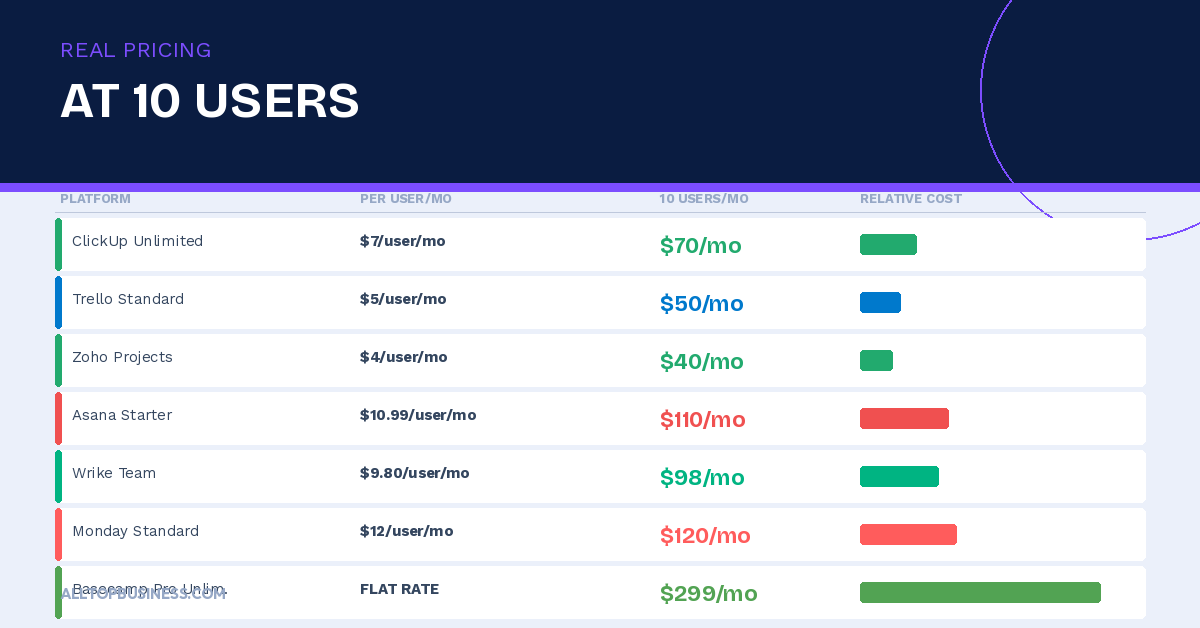
It varies significantly. Trello Standard at 10 users costs $50 per month. ClickUp Unlimited costs $70. Asana Starter costs $110. Monday.com Standard costs $120. Wrike Team costs $98. Basecamp covers unlimited users for $299 flat. Model your specific team size against each vendor’s current pricing page before committing.
What is the best project management tool for software teams?
Jira remains the industry standard for agile engineering teams — its sprint management, backlog tracking, and developer tool integrations are unmatched. Linear is the strongest alternative for modern software teams that find Jira too heavyweight. ClickUp covers both engineering and business stakeholders effectively if the team wants a single platform.
Final Verdict
For most business teams evaluating PM software for the first time, start with ClickUp. Its free plan is the most generous in the category, it handles virtually every work type, and it grows with you from 5 to 500 users without a platform migration.
If your priority is the fastest possible adoption with minimal setup, Monday.com gets teams running in hours and has the highest onboarding success rate of any platform in this list.
For remote and distributed teams, Basecamp solves the async communication problem better than any other tool at a flat price that becomes a genuine bargain above 20 users.
For software engineering teams, Jira or Linear. Jira if you need depth and customization, Linear if you want speed and modern design. For client-facing agencies, Teamwork handles the complete project-to-invoice workflow that general PM tools require integrations to support.
The only wrong move is delaying. Pick one, roll it out to one team, run it for 30 days, and build from there.
For more B2B software reviews, browse the AllTopBusiness blog. Have a question about which PM tool fits your specific team? Contact us directly.
External Sources:

I’m Adeyemi Adetilewa, a Content Marketing and SEO Specialist, Digital Strategist, Entrepreneur, and the Editor of AllTopBusiness.com. With over 13 years of experience helping businesses scale through content-driven growth, I’m happy to share all the top business tools I have discovered with you here.