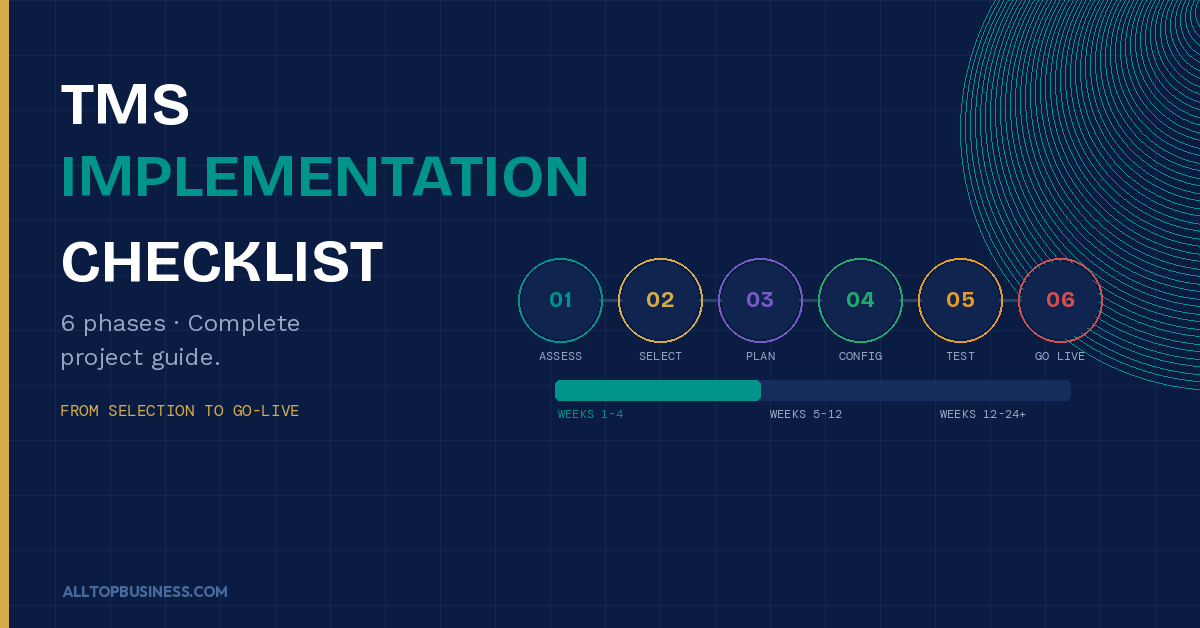
A successful TMS implementation follows six phases: needs assessment and business case, vendor selection, project planning and data preparation, configuration and integration, testing and training, and go-live with post-implementation review.
Most mid-market implementations take 3 to 6 months. Enterprise deployments with complex ERP integrations and multi-entity structures can take 6 to 12 months. This checklist covers every phase in detail, so your team knows exactly what to do and when.
Implementing a treasury management system is one of the highest-impact technology decisions a finance team makes. Done well, it eliminates manual cash reporting, gives leadership real-time visibility into cash and risk, strengthens payment controls, and frees your treasury team to focus on decisions rather than data collection.
Done poorly, it becomes one of the most expensive and frustrating IT projects your organization has ever run, with months of delays, incomplete integrations, and a system your team eventually works around rather than with.
The difference between a successful TMS implementation and a painful one almost always comes down to preparation. Teams that invest properly in needs assessment, data readiness, and change management before going live consistently achieve faster implementations and better outcomes than teams that rush straight to configuration.
This guide gives you a complete, phase-by-phase TMS implementation checklist you can use to plan, execute, and validate your deployment from start to finish.
For context on the platforms you might be implementing, read our full comparison of the best treasury software solutions available today.
What Is a TMS Implementation?
A TMS implementation is the end-to-end process of selecting, configuring, integrating, testing, and deploying a treasury management system within your organization. It covers everything from defining your requirements and evaluating vendors to connecting the system to your ERP and banking partners, training your team, and validating that the system produces accurate data before it goes live.
Unlike a simple SaaS tool where you sign up and start using it the same day, a TMS implementation is a structured project that touches your banking infrastructure, ERP systems, payment workflows, and finance team processes. It requires coordination across IT, finance, treasury, and often your banking partners and ERP vendor.
According to J.P. Morgan’s treasury research, organizations that implement a full-suite TMS see high efficiency gains in cash management, payment processing, and risk management, but the implementation requirements and effort are proportionally higher for more comprehensive deployments. The key is matching the depth of your implementation to the actual complexity of your treasury operations, not deploying more systems than you need.
How Long Does a TMS Implementation Take?
Implementation timelines vary widely depending on your organization’s size, the number of banking relationships being connected, ERP integration complexity, and how many treasury functions you are rolling out at once.
As a general guide:
| Organization Type | Typical Timeline |
|---|---|
| Small business (1-2 banks, single entity) | 2 to 6 weeks |
| Mid-market (3-10 banks, 1-3 entities) | 3 to 6 months |
| Enterprise (10+ banks, multi-entity, multi-currency) | 6 to 12 months |
| Global enterprise (complex risk, payments factory, in-house bank) | 12 to 18+ months |
Modern cloud-based platforms like Trovata and Agicap are on the faster end of these ranges due to their API-first connectivity and lighter configuration requirements. Full-suite enterprise platforms like Kyriba and ION Treasury are on the longer end, particularly when custom ERP integrations, hedge accounting modules, and multi-entity structures are involved.
One important principle: a phased implementation that goes live with core cash visibility in 90 days and adds functionality in subsequent phases almost always outperforms a big-bang approach that tries to deploy everything at once.
The 6-Phase TMS Implementation Checklist
Phase 1: Needs Assessment and Business Case
Everything that follows depends on getting this phase right. Teams that rush past needs assessment and go straight to vendor demos almost always end up selecting the wrong platform or scoping the project incorrectly.
Checklist:
- Document your current treasury processes end-to-end: cash positioning, forecasting, payments, bank reconciliation, risk management
- Identify every manual process and spreadsheet your team currently relies on
- Quantify the cost and time burden of your current manual processes (hours per week, error rates, headcount)
- Define the specific problems you are trying to solve. Be precise: “We spend 8 hours per week manually compiling cash positions from 6 bank portals” is more useful than “we want better cash visibility.”
- List your current banking relationships and connectivity methods (online banking, SFTP, SWIFT, API)
- Document your ERP system(s) and the data flows you will need between ERP and TMS
- Identify all stakeholders who will use or be affected by the system: treasury, AP, AR, IT, CFO, internal audit
- Define your must-have requirements versus nice-to-have requirements
- Establish your budget range for software licensing, implementation services, and ongoing support
- Build a business case with quantified expected benefits: hours saved, fraud risk reduction, forecast accuracy improvement, working capital optimization
Common mistake: Skipping the business case because the decision feels obvious. A documented business case gives you a benchmark to measure success against after go-live and helps secure internal sponsorship from the CFO and IT before the project begins.
Phase 2: Vendor Selection
With your requirements documented, you can now evaluate vendors against your actual needs rather than against generic feature lists.
Checklist:
- Create a shortlist of 3 to 5 vendors based on your company size, ERP environment, and primary use case. Use our best treasury software guide as a starting point
- Send a structured RFP or requirements questionnaire to each vendor covering: functionality, bank connectivity, ERP integration, implementation timeline, pricing model, support structure, and security certifications
- Request customer references specifically from companies of similar size and complexity to yours, not just the vendor’s marquee enterprise logos
- Run demos using your actual use cases, not the vendor’s standard demo script. Give each vendor the same scenarios so you can compare apples to apples
- Assess implementation methodology: Does the vendor use a structured phased approach? Do they provide a dedicated implementation consultant or hand you off to a partner?
- Evaluate bank connectivity: which banks connect natively? Which require a custom SFTP setup? How does the vendor handle new bank connections after go-live?
- Clarify the total cost of ownership: licensing, implementation fees, annual support, training, and the cost of additional modules you might add later
- Review the vendor’s security posture: SOC 2 Type II certification, data encryption standards, penetration testing cadence, and incident response procedures
- Check G2, Gartner Peer Insights, and Capterra for authentic user reviews. Pay particular attention to reviews that describe the implementation experience, not just the product features
- Negotiate contract terms, including implementation timeline, guarantees, SLAs for uptime and support response, and data portability rights if you ever switch vendors
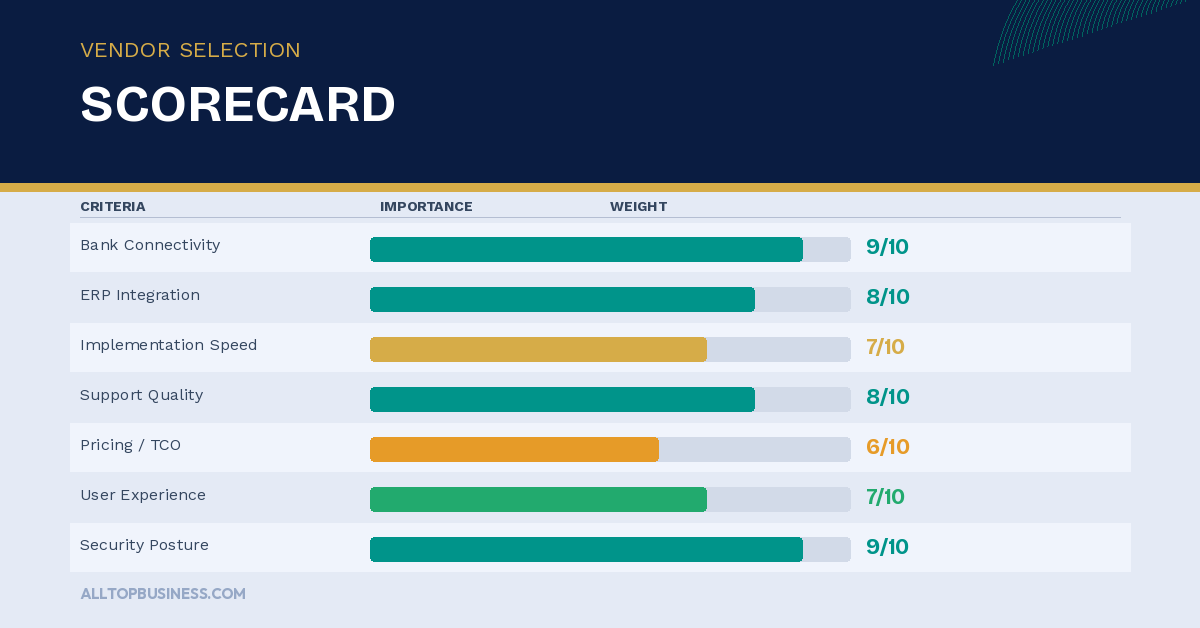
Decision criteria to weight most heavily: Bank connectivity depth, ERP integration quality, implementation methodology, and post-go-live support quality. These are where most implementations succeed or fail, not in the feature checklist.
Phase 3: Project Planning and Data Preparation
Once a vendor is selected, the project planning phase sets the structure that everything else runs on. This is also where data preparation happens, and where most teams chronically underinvest their time.
Project Planning Checklist:
- Appoint a dedicated internal project manager with authority to make decisions and escalate blockers
- Define the project team: treasury lead, IT/integration lead, ERP point of contact, banking partner contacts, and executive sponsor
- Build a detailed project plan with phases, milestones, dependencies, and deadlines agreed with the vendor
- Define go-live criteria: what does “done” look like? What data accuracy and system performance thresholds must be met before you switch off the old process?
- Establish a weekly project status cadence with the vendor’s implementation team
- Define your parallel-run period: how long will you run the new TMS alongside existing processes before cutting over fully?
- Plan your change management approach: who needs to be trained, when, and how will you handle resistance from team members comfortable with existing processes?
Data Preparation Checklist:
Data quality is the single most common cause of TMS implementation delays. Most teams dramatically underestimate how messy their bank account data, ERP chart of accounts, and cash flow categorization actually are until they try to load them into a new system.
- Audit and clean your bank account master data: account numbers, bank codes, currencies, entity ownership, and authorized signatories
- Standardize your chart of accounts and cash flow categories to ensure consistent mapping between ERP and TMS
- Reconcile your current cash positions across all bank portals so you have a validated opening balance to load into the new system
- Export and validate at least 13 weeks of historical transaction data from each bank. This is what the TMS will use for cash flow analysis and forecasting baseline
- Document all current payment templates, approval workflows, and payment limits so they can be replicated in the new system
- Map all ERP data fields to their TMS equivalents. Flag any gaps where ERP data is inconsistent or missing
- Get sign-off from internal audit on the data migration approach and the controls framework before configuration begins
Common mistake: Underestimating data preparation time. Budget at least as much time for data preparation as for system configuration. Dirty data loaded into a clean system produces dirty outputs that undermine confidence in the entire implementation.
Phase 4: Configuration and Integration
This is the phase where the TMS vendor’s implementation team does most of the hands-on system work, but your team needs to be actively involved throughout, not passive recipients.
Configuration Checklist:
- Load and validate bank account master data in the TMS
- Configure your organizational structure: legal entities, reporting hierarchies, and currency settings
- Set up cash flow categories and mapping rules to match your chart of accounts
- Configure payment workflows: approval limits, dual-control requirements, and payment scheduling rules
- Build your cash forecasting model: define inflow and outflow categories, time horizons, and data sources
- Configure risk management settings if applicable: FX exposure categories, hedge tracking parameters, and risk reporting templates
- Set up user roles, access permissions, and authentication requirements aligned with your segregation of duties requirements
- Configure reporting templates and dashboards to match the views your CFO and treasury team need
Integration Checklist:
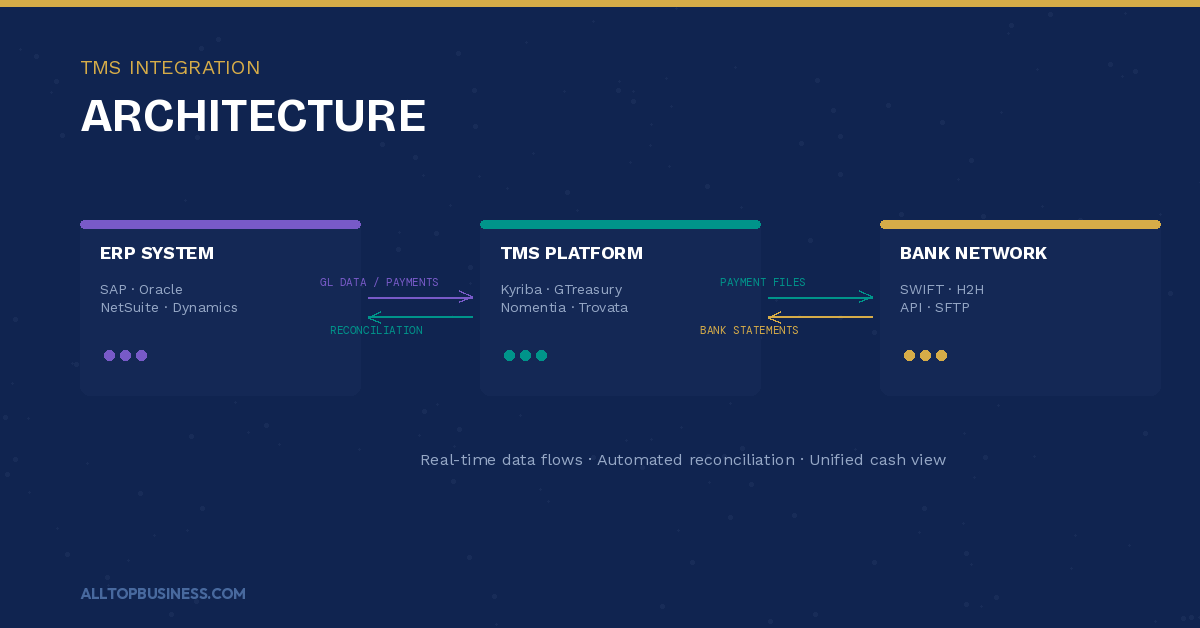
- Complete bank connectivity setup for each banking relationship: test SWIFT, H2H, or API connections in a sandbox environment before going live
- Build and test the ERP-to-TMS data feed: validate that payment data, AR/AP balances, and general ledger entries flow correctly and on the expected schedule
- Test bank statement downloads: verify that all transaction types are imported correctly and that categorization rules apply as expected
- Validate currency conversion and FX rate feed integration, if applicable
- Test payment file generation and transmission to each bank. Include both standard payment types and any specialized formats your banks require
- Document all integrations with data flow diagrams and error handling procedures for your IT team’s ongoing maintenance
Phase 5: Testing and Training
No TMS should go live without a structured testing phase and comprehensive user training. This phase is where you find the problems before your live cash positions are at stake.
Testing Checklist:
- Unit testing: verify that each configuration element (payment workflow, bank feed, cash forecast) works as designed in isolation
- Integration testing: verify that data flows correctly between the TMS, your ERP, and your banking partners end-to-end
- User acceptance testing (UAT): Have your actual treasury team run their real-world daily processes in the TMS using test data, not just the scenarios the vendor suggested
- Parallel run: operate the TMS alongside your existing process for at least two to four weeks, comparing TMS outputs to your current manual process outputs and investigating any discrepancies
- Reconciliation validation: verify that TMS cash positions match bank statement balances within your defined tolerance threshold
- Payment testing: run test payments through the full approval and transmission workflow for each payment type and each bank before processing any live transactions
- Disaster recovery and failover testing: confirm what happens if the TMS is unavailable and document the manual fallback process your team will follow
- Security testing: confirm that access controls are working correctly. Test that each user role can only see and do what they are supposed to
Training Checklist:
- Develop role-based training plans: treasury team members, AP team members, approvers, and read-only reporting users all need different training content
- Conduct hands-on training sessions using real scenarios from your business, not generic vendor training materials
- Create quick-reference guides for the most common daily tasks: cash position review, payment approval, bank reconciliation, and cash forecast update
- Train your IT team on system administration, user management, and first-line troubleshooting
- Identify and train power users in each team who can support colleagues with day-to-day questions after go-live
- Document escalation procedures: who to contact at the vendor for Level 2 support, and what constitutes a critical incident requiring immediate escalation
Phase 6: Go-Live and Post-Implementation Review
The go-live is not the finish line. The weeks immediately after go-live are when your team is most vulnerable to process gaps and configuration issues that did not surface during testing.
Go-Live Checklist:
- Confirm that all go-live criteria defined in Phase 3 have been met before cutting over
- Execute the cutover plan: load validated opening balances, activate live bank connections, and switch payment processing from the old workflow to the TMS
- Schedule daily check-ins with the vendor’s implementation team for the first two weeks after go-live
- Run a live parallel reconciliation for the first week: compare TMS cash positions to bank portal balances daily and investigate any discrepancy immediately
- Monitor the first live payment run closely: verify that payment files are transmitted correctly, received by banks, and settled as expected
- Establish your ongoing support model: who is the internal system owner, what is the process for requesting configuration changes, and how are user access changes handled?
- Communicate go-live status to all stakeholders: treasury team, CFO, IT, internal audit, and banking partners
Post-Implementation Review Checklist (30-60-90 days after go-live):
- Measure actual outcomes against the business case: are you achieving the hours saved, forecast accuracy improvements, and process efficiency gains you projected?
- Survey your treasury and finance team on system usability and identify the top friction points to address in the first configuration update cycle
- Review any issues or workarounds that emerged during the first 30 days and create a prioritized fix list with the vendor
- Assess data quality: Are your cash forecasts using the TMS producing more accurate results than your previous process? Track forecast accuracy from day one
- Schedule your first KPI review: pull the treasury management KPIs you defined in Phase 1 and assess where you stand relative to targets. Our guide on treasury management KPIs covers the metrics to track
- Document lessons learned from the implementation for future system expansion or module additions
- Plan Phase 2 if you took a phased approach: which additional modules or banking connections are ready to add next?
The 8 Most Common TMS Implementation Mistakes
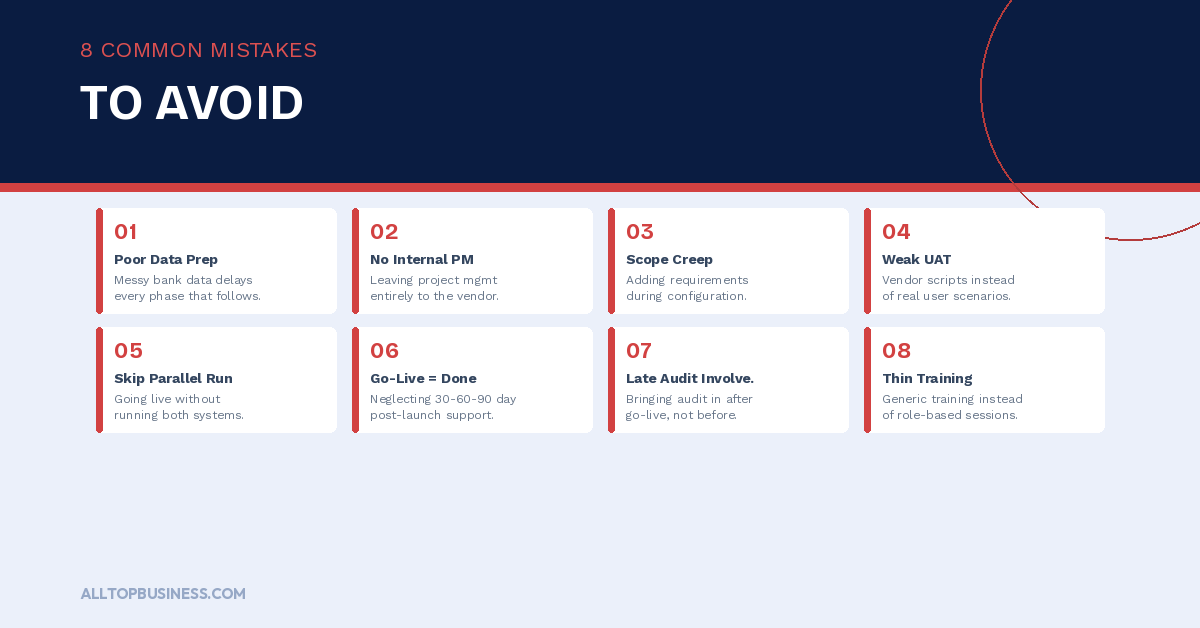
Understanding where implementations go wrong is as valuable as knowing what to do right. These are the eight most common failure points based on how treasury implementations play out in practice.
1. Underestimating data preparation. Bank account data, ERP chart of accounts mappings, and cash flow categories are almost always messier than teams expect. Build at least as much time into your project plan for data cleanup as for system configuration.
2. No dedicated internal project manager. Leaving the project management entirely to the vendor’s implementation consultant is a recipe for delays. The vendor manages the system side. You need an internal owner who manages stakeholder alignment, internal dependencies, and decision-making.
3. Scope creep during configuration. Teams frequently try to solve additional problems during implementation that were not in the original scope. Each addition extends the timeline and increases complexity. Document scope changes formally and assess their impact on the timeline and budget before agreeing to them.
4. Insufficient UAT. Vendor-led demos and standard test scripts are not substitutes for your treasury team running their actual daily processes in the system using real scenarios. UAT should be conducted by the people who will use the system every day, not just IT.
5. Skipping the parallel run. Going live without a parallel run period is a high-risk approach. Running the TMS alongside your existing process for two to four weeks catches discrepancies before they affect live cash management decisions.
6. Treating go-live as the finish line. The 30 to 60 days after go-live are when most configuration gaps and process issues emerge. Plan for intensive post-go-live support and build your vendor engagement model for this period into the contract before you sign.
7. Not involving the internal audit early. Internal audit will eventually review your TMS controls. Involving them in the control framework design during Phase 3 rather than after go-live is far less disruptive and produces better outcomes.
8. Underinvesting in training. A treasury team that does not fully understand how to use the system will revert to spreadsheets for anything the system makes even slightly difficult. Role-based, hands-on training using real scenarios is not optional — it is what determines whether the system actually gets used.
Signs You Are Ready for a TMS
Not every organization needs a TMS. But if several of the following apply to your situation, the investment is likely justified and overdue.
- Your team spends more than 4 to 5 hours per week manually compiling cash positions from bank portals
- You manage banking relationships with more than three or four banks
- Your cash flow forecasts are built in spreadsheets and updated manually
- You have active FX exposure that is tracked in a spreadsheet, or not tracked at all
- Your payment approval process relies on email chains rather than a formal workflow system
- You have experienced a near-miss or actual payment fraud incident
- You manage cash across multiple legal entities or countries
- Your CFO or board cannot get a real-time cash position without asking the treasury team to compile it manually
If three or more of these apply, the business case for a TMS is almost certainly there. The question is which platform is right for your situation, not whether to move forward.
For a full comparison of platforms by company size and use case, read our guide on the best treasury software solutions. And once your system is live, our guide on cash forecasting for treasury teams will help you get maximum value from your new forecasting capabilities immediately.
Frequently Asked Questions
How long does a TMS implementation take?
It depends on your organization’s complexity. Small businesses implementing a tool like Agicap or Trovata can be live within weeks. Mid-market implementations with multiple banking relationships and ERP integrations typically take 3 to 6 months.
Enterprise deployments with multi-entity structures, SWIFT connectivity, and risk management modules typically take 6 to 12 months. A phased approach that gets core cash visibility live in 90 days before adding further modules is recommended for most mid-market organizations.
What is the biggest risk in a TMS implementation?
Data quality is consistently the biggest implementation risk. Inconsistent bank account data, poorly mapped ERP chart of accounts, and unclean cash flow categories cause more delays and post-go-live issues than any system or integration problem. Invest heavily in data preparation before configuration begins.
Do I need a consultant to implement a TMS?
For enterprise deployments with complex ERP integrations and multi-entity structures, an experienced treasury implementation consultant adds significant value.
For mid-market implementations, most reputable TMS vendors provide their own implementation consultants as part of the engagement. Smaller platforms like Trovata and Agicap are designed for self-service implementation with vendor support.
How do I choose between a phased implementation and a big-bang deployment?
A phased approach is almost always preferable. Going live with core cash visibility and bank connectivity first, then adding forecasting, payments, and risk management in subsequent phases, reduces risk and gets your team realizing value faster.
Big-bang deployments that try to deploy everything at once are more likely to experience delays, budget overruns, and post-go-live issues.
What happens if the TMS implementation fails?
Failed or abandoned TMS implementations are more common than vendors admit. The most common causes are insufficient data preparation, scope creep, lack of internal project ownership, and poor vendor selection.
If an implementation is struggling, bring in an external treasury consultant to assess the root cause before abandoning the project. Many troubled implementations can be recovered with proper re-scoping and re-planning.
How should I measure the success of my TMS implementation?
Measure success against the business case you built in Phase 1. Key metrics include: hours per week saved on manual cash reporting, improvement in cash forecast accuracy, reduction in payment processing time, increase in cash visibility percentage across all accounts, and any reduction in fraud incidents. Track these metrics from the first week after go-live and review them at 30, 60, and 90 days.
Final Thoughts
A TMS implementation is a significant investment in time, money, and organizational attention. But the finance teams that get it right come out the other side with real-time cash visibility, automated reporting, stronger payment controls, and a treasury function that operates at a fundamentally higher level than before.
The checklist in this guide gives you the structure to approach every phase with clarity. Use it as a working document throughout your project, not just a reference. Customize it to your organization’s specific situation, share it with your vendor’s implementation team, and revisit it at each phase transition to confirm nothing has been missed.
For more treasury management guides and B2B finance tool reviews, browse the AllTopBusiness blog. If you have a specific question about your TMS selection or implementation, contact our team directly.
External Sources:
- J.P. Morgan — Treasury Management System Selection and Implementation
- Association for Financial Professionals — Treasury Technology Resources

I’m Adeyemi Adetilewa, a Content Marketing and SEO Specialist, Digital Strategist, Entrepreneur, and the Editor of AllTopBusiness.com. With over 13 years of experience helping businesses scale through content-driven growth, I’m happy to share all the top business tools I have discovered with you here.